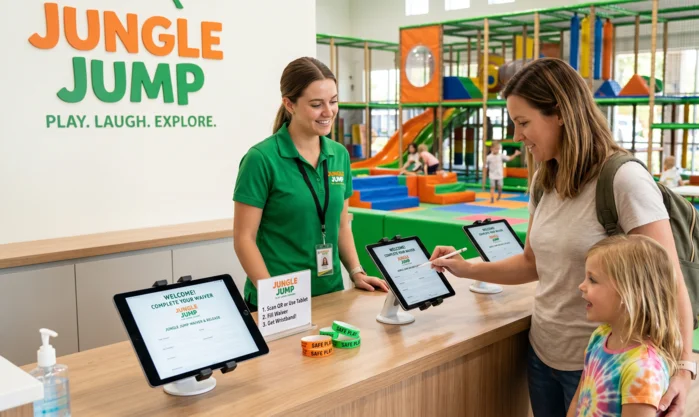
How to Set Up a Waiver System for Your Indoor Playground
An indoor playground waiver system should collect a state-specific parental waiver before play, verify guardian authority, store a strong e-signature record, and connect each waiver to bookings, check-ins, incidents, and maintenance logs. A solid setup has four layers: legal language, digital signing, front-desk workflow, and child-data privacy (particularly under updated COPPA rules, as detailed in our guide on FEC technology trends). Start with attorney-reviewed templates for every state where you operate, then build the software flow around guardian verification, audit trails, and fast entry during busy weekends.
Use this guide as an operator checklist. Have a local attorney review the final waiver before launch because US waiver enforceability changes by state, activity type, participant age, and injury facts.
What should an indoor playground waiver system include?
An indoor playground waiver system should include a guardian-signed legal document, a digital signature audit trail, a parent-child profile structure, and a renewal process.
Your minimum setup should cover these parts:
- State-specific waiver template: Your waiver language should match the state where the facility operates.
- Guardian identity capture: The system should record the signer’s full name, contact details, relationship to each child, signature timestamp, IP address, and device record.
- Child participant profiles: Each child profile should include name, date of birth, linked guardian, active waiver status, and visit history.
- Rules acknowledgment: Parents should confirm socks, height zones, age zones, supervision rules, illness policy, food rules, and emergency procedures.
- Assumption of risk language: The form should describe indoor playground risks such as falls, collisions, climbing injuries, slide exits, and interaction with other children.
- Medical and emergency contact fields: Staff should know who to call and what conditions matter during an incident.
- Photo and marketing consent: Photo consent should sit in a separate opt-in field, especially when minors appear in images.
- Version control: Each signed waiver should preserve the exact waiver text signed by the parent.
- Retention policy: The business should define how long waivers, child data, and incident records remain stored.
Treat the waiver as one part of your risk file. The strongest defense usually combines signed waivers, posted rules, trained staff, inspection logs, incident reports, and proof that the facility fixed hazards quickly.
How do state laws affect playground waivers?
State law controls whether a waiver can block a negligence claim, especially when a parent signs for a minor child.
Florida gives commercial activity providers a clearer statutory path. Florida Statute Section 744.301 authorizes a natural guardian to waive certain claims for a minor child when the claim arises from inherent risks of the activity. The statute also requires a specific uppercase notice in a font at least five points larger than the rest of the waiver text.
New York takes a stricter approach for paid recreational facilities. New York General Obligations Law Section 5-326 says agreements that try to exempt paid recreation operators from liability for their own negligence are void and unenforceable. For an indoor playground owner, a New York waiver can document risk awareness, house rules, and emergency consent. The operator still needs inspection logs, staff training, incident records, and insurance.
California generally allows well-drafted recreational waivers for ordinary negligence, including parent-signed waivers in many minor recreation contexts. California still does not allow businesses to waive gross negligence, recklessness, or intentional misconduct.
Texas, Illinois, Kentucky, and other states can create tougher issues around parent-signed minor waivers. Some states restrict pre-injury releases for children. Some states scrutinize parent-to-business indemnity clauses. A multi-state operator should not reuse one generic form across every location.
Which waiver clauses should you separate?
A playground waiver should separate release language, assumption of risk, indemnity, medical authorization, and media consent.
Bundling every clause into one dense paragraph creates practical problems. Parents skim it. Staff cannot explain it. Courts may question the form’s clarity. A cleaner form gives each clause a clear heading and a specific purpose.
Liability Release
A liability release asks the signer to release the business from certain claims. The release should name the legal business entity, owners, staff, contractors, affiliates, and property owner if applicable. The release should state the covered activity, the covered date range, and the type of claims covered.
Assumption of Risk
An assumption of risk section records that the parent understands the normal hazards of active play. Indoor playground risks include running, jumping, climbing, swinging, sliding, falling, tripping, colliding with other guests, and misuse of equipment.
This section matters even in states where negligence waivers face limits. Risk acknowledgment can support a defense that the parent received clear information before the child participated.
Parent Indemnity
A parent indemnity clause asks the parent to reimburse the business if a child’s claim creates defense costs, settlements, or judgments. State law treats these clauses unevenly. Your attorney should confirm whether parent indemnity works in your state and whether the language creates a conflict with the child’s rights.
Medical Authorization
A medical authorization section lets staff call emergency services and share basic emergency details when a child needs care. The form should collect allergies, medical conditions, emergency contacts, and parent phone numbers.
Photo and Marketing Consent
Photo consent should be optional and separate from play admission. A parent who refuses marketing consent should still be able to complete the play waiver. The consent should identify the channels covered, such as website, social media, email, print ads, and in-venue screens.
How do you make digital waivers legally stronger?
Digital waivers become stronger when the system proves who signed, what they signed, when they signed, and how the record was stored.
The US ESIGN Act supports electronic signatures when the signer intends to sign and the signature connects to the record. Cornell Law’s summary quotes the core rule: electronic contracts “may not be denied legal effect” only because they are electronic.
Your digital waiver platform should capture:
- Signer intent: The parent should click a clear checkbox such as “I agree to sign electronically.”
- Full legal name: The signer should type a full first and last name.
- Signature mark: The system should capture typed, drawn, or click-to-sign signature evidence.
- Timestamp: The record should store date, time, and time zone.
- IP address and device metadata: The platform should preserve basic attribution data.
- Document version: The system should store the exact template version signed.
- Linked participants: The waiver should show every child covered by that signature.
- Staff override logs: Any manual edit should show who changed the record, when, and why.
Avoid paper whenever possible. Paper slows down check-in, creates filing gaps, and makes incident response harder. If you accept paper during an outage, scan the signed form, attach the scan to the family profile, and mark the source as paper.
How do you verify the right adult signed?
The waiver system should verify that the signer is a parent, natural guardian, legal guardian, or authorized adult allowed under your policy.
Birthday parties create the highest risk. A party host may arrive with eight children and try to sign for all of them. That signature may have little value for children who are not the host’s legal responsibility.
Use this workflow:
- Ask the party host for guest emails before the event. The booking system should send each invited family a waiver link.
- Require each child’s own parent or guardian to sign. The waiver record should link the child to that guardian.
- Flag host-signed guest waivers. If your policy allows temporary host acknowledgment, label the relationship as “party host” or “authorized pickup,” not “parent.”
- Replace weak relationships with guardian records. When the real parent signs later, the system should archive the host record and make the guardian waiver active.
- Train staff to stop the line when a waiver looks wrong. Speed matters, but a bad waiver creates false confidence.
For higher-risk attractions, ask for ID when the signer’s relationship looks unclear. The system should record that staff verified the adult, without storing unnecessary ID numbers unless counsel approves that practice.
Which software features matter most?
Indoor playground waiver software should reduce legal gaps, shorten check-in, and keep customer records clean.
Prioritize these features before comparing price:
- Online pre-arrival waivers: Customers should sign during booking, from reminder emails, and from SMS links.
- Birthday party guest links: Party hosts should send a single link to invited parents.
- QR code support: Walk-ins should scan a lobby sign and complete the waiver on their own phone.
- Kiosk mode: Tablets should run in a locked app mode so guests cannot access device settings.
- Offline signing: The app should store signatures during Wi-Fi outages and sync later.
- Parent-child relationships: The database should link one guardian to multiple children and one child to multiple approved guardians.
- Duplicate detection: The system should detect duplicate families by phone, email, and child name.
- Waiver expiration rules: The system should require renewal after 12 months, after a template update, or after a policy change.
- POS and booking integration: Staff should see waiver status before selling admission.
- Incident report links: The incident record should connect to the child profile, waiver version, staff notes, and inspection logs.
Waiver-only tools can work for small venues. All-in-one family entertainment platforms can work better when you also need booking, memberships, group bookings, wristbands, party rooms, capacity controls, and POS. The right choice depends on guest volume, party volume, staff count, and whether your team can maintain integrations.
How should check-in work on a busy day?
Check-in should identify unsigned guests before they reach the counter.
Build a flow like this:
- Before arrival: Booking confirmation emails should include waiver links for every child.
- Two days before a party: The system should remind the host to forward guest waiver links.
- At the entrance: Large signs should show a QR code for walk-in waivers.
- At the counter: Staff should search by phone number first, then email, then child name.
- At the gate: Wristband, stamp, or ticket status should confirm waiver completion.
- After entry: Staff should log incidents, rule violations, and removals in the same customer profile.
The front desk should have one clear rule: no active waiver, no play. If staff can override that rule, the system should require a manager login and a reason.
How do COPPA and privacy rules affect child data?
COPPA affects indoor playground operators when their websites, apps, or waiver tools collect personal information from children under 13 or when the operator has actual knowledge that child data is being collected.
The FTC published final COPPA amendments in 2025, and most covered operators had to reach full compliance by April 22, 2026. The FTC’s COPPA final rule page identifies several operator duties, including tighter consent, security, and data handling requirements.
For a playground waiver system, privacy controls should include:
- Data minimization: Collect only the child data needed for admission, safety, pricing, and emergency response.
- Parent-facing notice: Explain what data you collect, why you collect it, how long you keep it, and who receives it.
- Written security program: Define who can access child data, how passwords work, how vendors are reviewed, and how incidents are handled.
- Written retention policy: Delete or anonymize child data after the business purpose and legal retention period end.
- Separate marketing consent: Do not mix play admission with promotional consent.
- Vendor review: Confirm whether your waiver, POS, email, SMS, camera, and analytics vendors process child data.
Do not store government ID numbers, biometric data, or health details unless the business has a clear reason, strong security, and legal review. More data creates more exposure.
How do safety logs support your waiver system?
Safety logs support the waiver system by proving that the facility inspected equipment, responded to hazards, and maintained the play space with care.
The CPSC Public Playground Safety Handbook gives operators a useful maintenance principle: “This routine maintenance schedule should not replace regular inspections.” For indoor playgrounds, that means staff should document quick daily checks and deeper scheduled inspections.
Use a three-layer inspection rhythm:
- Daily opening check: Staff should check slides, netting, padding, mats, gates, restrooms, spill areas, hand sanitizer, signage, and visible damage.
- Weekly equipment check: A manager should inspect anchors, bolts, seams, foam wear, entry gates, emergency exits, and high-impact zones.
- Monthly documented review: Ownership or maintenance leads should review incident patterns, repair tickets, manufacturer guidance, and staff training gaps.
Every inspection record should include date, time, staff member, checklist items, problems found, corrective action, and closure time. If a child gets hurt, your team should be able to pull the waiver, incident report, video retention status, and inspection logs from the same operational record.
What should your rollout plan look like?
A clean rollout takes about four to eight weeks for a single location when the team already has booking software.
Week 1: Legal and Policy Review
Hire a local attorney to draft or revise the waiver. Give counsel your attraction list, floor plan, age zones, rules, photos policy, birthday process, and incident history. Ask counsel to review state rules for minor waivers, parent indemnity, medical consent, and media consent.
Week 2: Software Setup
Choose the waiver platform. Build parent-child fields, birthday party flows, expiration rules, and waiver templates. Turn on audit trails and manager-only overrides.
Week 3: Privacy and Data Controls
Update the privacy notice. Define child-data retention periods. Review vendors. Limit staff access by role. Remove unnecessary fields from the waiver.
Week 4: Kiosks and Lobby Flow
Install QR signs. Lock tablets in kiosk mode. Test offline signing. Place waiver prompts in confirmation emails, party emails, and reminder texts.
Week 5: Staff Training
Train staff on guardian verification, duplicate profiles, expired waivers, party guests, paper fallback, incident logging, and manager overrides. Give staff short scripts for common questions.
Week 6: Soft Launch
Run the system for one week before enforcing the new flow fully. Track unsigned arrivals, duplicate records, average check-in time, party waiver completion, and staff override reasons.
Week 7 and Beyond: Audit and Improve
Review waiver completion weekly for the first month. Then review monthly. Update forms after legal changes, attraction changes, ownership changes, or major incident learnings.
Indoor playground waiver system checklist
Use this checklist before launch:
- Attorney reviewed the waiver for the operating state.
- The waiver names the correct legal entity.
- The waiver separates release, risk acknowledgment, indemnity, medical consent, and photo consent.
- Each waiver stores signer name, timestamp, IP address, device data, waiver version, and covered children.
- Each child profile links to a parent or legal guardian.
- Birthday party guests receive direct waiver links.
- Lobby QR codes work on mobile devices.
- Tablets run in locked kiosk mode.
- Staff can see waiver status inside booking or POS screens.
- Manager overrides require a reason.
- Duplicate family profiles have a merge process.
- Waivers renew after a defined period or template change.
- Child data has a written retention policy.
- Marketing consent stays separate from admission.
- Daily, weekly, and monthly inspection logs connect to incident records.
FAQ
Can a waiver prevent every lawsuit?
A waiver cannot prevent every lawsuit because state law, injury facts, gross negligence, and minor-rights rules control enforceability. A waiver works best as part of a larger risk management file.
Should parents sign a waiver every visit?
Most indoor playgrounds renew waivers annually and require a new signature after a template change. Higher-risk venues may require more frequent renewal. Your attorney and insurer should approve the renewal period.
Can a birthday party host sign for every child?
A birthday party host should sign only for the host’s own child unless the host has legal authority for another child. Each invited child should have a waiver signed by that child’s parent or legal guardian.
Are digital waivers better than paper waivers?
Digital waivers usually create better evidence because the system stores signer data, timestamps, waiver versions, and linked child profiles. Paper waivers can work as a fallback when staff scan and attach the signed form to the correct profile.
How long should an indoor playground keep waivers?
Waiver retention should match state limitation periods, minor tolling rules, insurance requirements, and privacy duties. Many venues keep incident-related records longer than ordinary customer records. Ask counsel to set a written retention schedule.